Tổng quan
Next.js 13+ App Router mang đến React Server Components (RSC) - một paradigm shift trong cách xây dựng React apps. Hiểu rõ sự khác biệt giữa Server và Client Components là chìa khóa để tối ưu performance.
1. Server Components vs Client Components
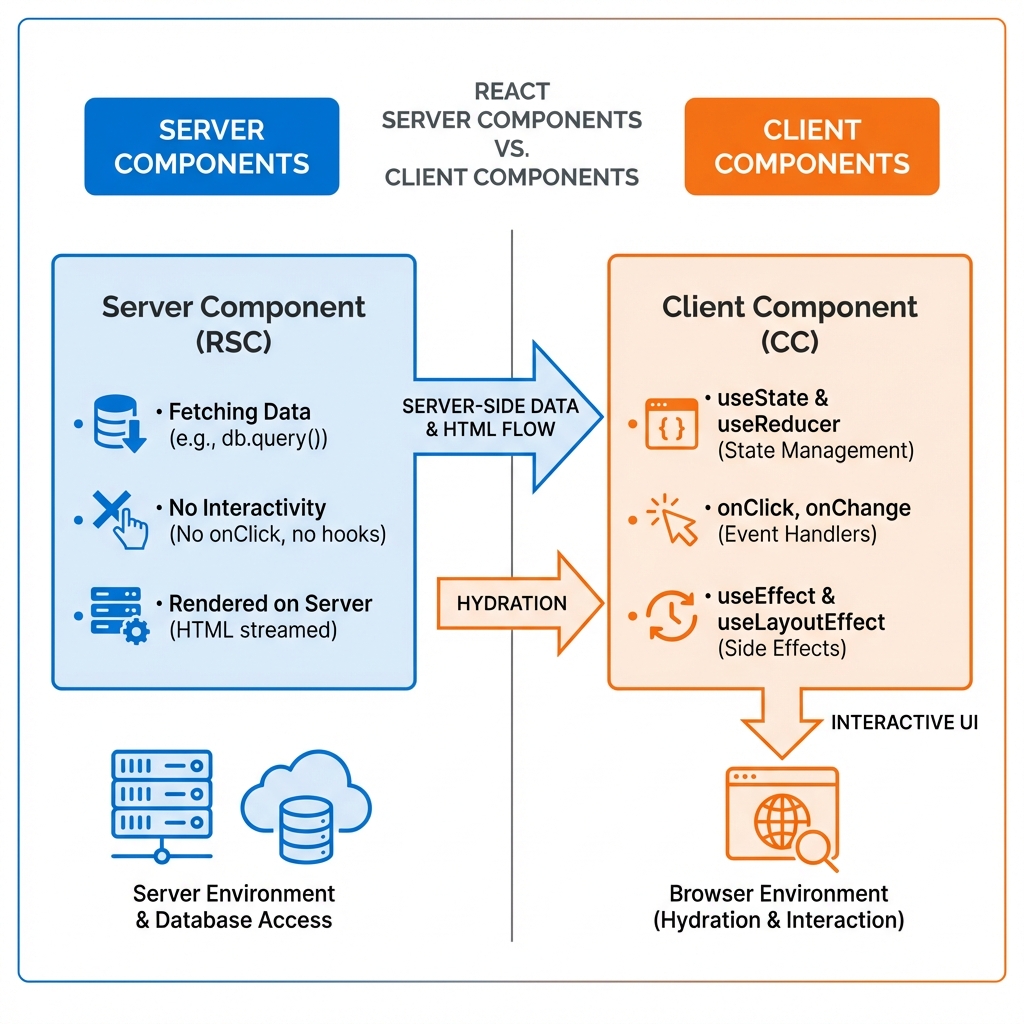
Giải thích chi tiết hình minh họa:
Cột trái - Server Components (màu xanh):
Đặc điểm:
- ✅ Fetching Data trực tiếp: Có thể gọi database, API, đọc file system
- ✅ No Interactivity: Không có event handlers (
onClick,onChange) - ✅ Rendered on Server: Chạy trên server, tạo HTML và stream về client
- ✅ Zero JavaScript: Không gửi JavaScript code về browser → Giảm bundle size
- ✅ Access Server Resources: Truy cập biến môi trường, database credentials an toàn
Môi trường chạy:
- Server-side (Node.js runtime)
- Có quyền truy cập database, file system, server APIs
Khi nào dùng:
tsx:
// ✅ Server Component - Default trong App Router
async function ProductList() {
  // Fetch data trực tiếp từ database
  const products = await db.product.findMany();

  return (
    <div>
      {products.map(product => (
        <ProductCard key={product.id} data={product} />
      ))}
    </div>
  );
}
Cột phải - Client Components (màu cam):
Đặc điểm:
- ✅ useState & useReducer: Quản lý state
- ✅ Event Handlers:
onClick,onChange,onSubmit - ✅ useEffect & useLayoutEffect: Side effects
- ✅ Browser APIs:
window,localStorage,navigator - ✅ Interactive UI: Forms, buttons, animations
Môi trường chạy:
- Browser (client-side)
- Hydration: Server render HTML trước, sau đó "hydrate" (gắn JavaScript) trên client
Khi nào dùng:
tsx:
// ✅ Client Component - Phải khai báo "use client"
'use client';

import { useState } from 'react';

function AddToCartButton({ productId }) {
  const [loading, setLoading] = useState(false);

  const handleClick = async () => {
    setLoading(true);
    await addToCart(productId);
    setLoading(false);
  };

  return (
    <button onClick={handleClick} disabled={loading}>
      {loading ? 'Adding...' : 'Add to Cart'}
    </button>
  );
}
Luồng dữ liệu (Server → Client):
-
Server-Side Data & HTML Flow:
- Server Component fetch data từ database
- Render thành HTML với data đã có
- Stream HTML về browser
-
Hydration:
- Browser nhận HTML (hiển thị ngay nội dung tĩnh)
- Client Component JavaScript được tải
- React "hydrate" - gắn event handlers vào HTML tĩnh
2. Composition Patterns (Mô hình kết hợp)
Pattern 1: Server Component bọc Client Component
tsx:
// ✅ BEST: Server Component làm root
// app/products/page.tsx (Server Component)
import ClientSidebar from './ClientSidebar'; // Client Component

async function ProductsPage() {
  const categories = await db.category.findAll(); // Fetch server-side

  return (
    <div className="flex">
      {/* Server Component fetch data, Client Component handle UI */}
      <ClientSidebar categories={categories} />
      <ProductList />
    </div>
  );
}
Pattern 2: Passing Server Components as Children
tsx:
// ✅ ADVANCED: Server Component làm children của Client Component
// ClientLayout.tsx
'use client';

export function ClientLayout({ children }) {
  const [sidebarOpen, setSidebarOpen] = useState(false);

  return (
    <div>
      <button onClick={() => setSidebarOpen(!sidebarOpen)}>Toggle</button>
      {/* children VẪN là Server Component! */}
      <div>{children}</div>
    </div>
  );
}

// page.tsx (Server Component)
import ClientLayout from './ClientLayout';

async function Page() {
  const data = await fetchData(); // Server-side

  return (
    <ClientLayout>
      {/* Component này render trên server */}
      <ServerContent data={data} />
    </ClientLayout>
  );
}
Pattern 3: Avoid Client-Server Boundary Issues
tsx:
// ❌ BAD: Client Component không thể import Server Component
'use client';

import ServerData from './ServerData'; // ERROR!

// ✅ GOOD: Pass Server Component as prop
'use client';

export function ClientWrapper({ serverContent }) {
  return <div>{serverContent}</div>;
}

// Usage in Server Component
<ClientWrapper serverContent={<ServerData />} />
3. Data Fetching Strategies
Strategy 1: Parallel Data Fetching
tsx:
// ✅ BEST: Fetch song song
async function DashboardPage() {
  // Các request chạy song song
  const [user, posts, analytics] = await Promise.all([
    fetchUser(),
    fetchPosts(),
    fetchAnalytics()
  ]);

  return (
    <>
      <UserProfile user={user} />
      <PostsList posts={posts} />
      <AnalyticsDashboard data={analytics} />
    </>
  );
}
Strategy 2: Sequential Data Fetching (khi cần)
tsx:
// ✅ GOOD: Fetch tuần tự khi có dependency
async function UserDashboard({ userId }) {
  const user = await fetchUser(userId);
  // Chỉ fetch posts SAU KHI có user
  const posts = await fetchUserPosts(user.id);

  return (
    <>
      <UserProfile user={user} />
      <PostsList posts={posts} />
    </>
  );
}
Strategy 3: Streaming với Suspense
tsx:
// ✅ ADVANCED: Stream từng phần
import { Suspense } from 'react';

async function Page() {
  return (
    <div>
      {/* Phần này render ngay */}
      <Header />

      {/* Phần này render khi data ready */}
      <Suspense fallback={<Skeleton />}>
        <SlowComponent />
      </Suspense>

      {/* Phần này cũng stream riêng */}
      <Suspense fallback={<Skeleton />}>
        <AnotherSlowComponent />
      </Suspense>
    </div>
  );
}

async function SlowComponent() {
  const data = await fetchSlowData(); // 2s
  return <div>{data}</div>;
}
4. Caching & Revalidation
Next.js tự động cache requests
tsx:
// Default: Cache vĩnh viễn
async function getData() {
  const res = await fetch('https://api.example.com/data');
  return res.json();
}

// Revalidate mỗi 60s
async function getData() {
  const res = await fetch('https://api.example.com/data', {
    next: { revalidate: 60 }
  });
  return res.json();
}

// No cache (dynamic data)
async function getData() {
  const res = await fetch('https://api.example.com/data', {
    cache: 'no-store'
  });
  return res.json();
}

// Revalidate on-demand
import { revalidatePath, revalidateTag } from 'next/cache';

async function updatePost() {
  await db.post.update(...);
  revalidatePath('/posts'); // Invalidate cache cho route này
}
5. Performance Optimization Checklist
✅ Do's (Nên làm)
- Maximize Server Components
tsx:
// ✅ Default: Server Component
async function Page() {
  const data = await fetchData();
  return <View data={data} />;
}- Push "use client" xuống thấp nhất có thể
tsx:
// ❌ BAD: Toàn bộ page là Client Component
'use client';
function Page() {
  return (
    <div>
      <Header />
      <InteractiveButton /> {/* Chỉ cái này cần client */}
      <Footer />
    </div>
  );
}

// ✅ GOOD: Chỉ component cần thiết là Client
function Page() {
  return (
    <div>
      <Header />
      <InteractiveButton /> {/* Chỉ cái này "use client" */}
      <Footer />
    </div>
  );
}- Sử dụng Server Actions cho mutations
tsx:
// app/actions.ts
'use server';

export async function createPost(formData) {
  const title = formData.get('title');
  await db.post.create({ data: { title } });
  revalidatePath('/posts');
}

// Component (Server Component!)
import { createPost } from './actions';

function NewPostForm() {
  return (
    <form action={createPost}>
      <input name="title" />
      <button type="submit">Create</button>
    </form>
  );
}
❌ Don'ts (Tránh)
- Không fetch data trong Client Component
tsx:
// ❌ BAD
'use client';
function Posts() {
  const [posts, setPosts] = useState([]);

  useEffect(() => {
    fetch('/api/posts')
      .then(res => res.json())
      .then(setPosts);
  }, []);

  return <div>{posts.map(...)}</div>;
}

// ✅ GOOD: Fetch trong Server Component
async function Posts() {
  const posts = await db.post.findMany();
  return <div>{posts.map(...)}</div>;
}- Không import Client Component vào Server Component không cần thiết
tsx:
// ❌ BAD: Import carousel làm toàn bộ page thành Client
import Carousel from 'react-slick'; // Client Component

// ✅ GOOD: Tách riêng Client Component
// CarouselWrapper.tsx
'use client';
import Carousel from 'react-slick';
export function CarouselWrapper({ children }) {
  return <Carousel>{children}</Carousel>;
}
6. Common Mistakes
Mistake 1: Mixing Server/Client Logic
tsx:
// ❌ BAD: Không thể dùng useState trong Server Component
async function Page() {
  const [count, setCount] = useState(0); // ERROR!
  const data = await fetchData();
  return <div onClick={() => setCount(count + 1)}>{data}</div>;
}

// ✅ GOOD: Tách thành 2 component
async function Page() {
  const data = await fetchData(); // Server
  return <ClientInteractive data={data} />; // Client
}
Mistake 2: Serialization Issues
tsx:
// ❌ BAD: Không thể pass functions/Date từ Server → Client
async function Page() {
  const data = {
    createdAt: new Date(), // ERROR: Date không serialize được
    onClick: () => {} // ERROR: Function không serialize được
  };
  return <ClientComponent data={data} />;
}

// ✅ GOOD: Chỉ pass JSON-serializable data
async function Page() {
  const data = {
    createdAt: new Date().toISOString(), // String
    // onClick xử lý trong ClientComponent
  };
  return <ClientComponent data={data} />;
}
Mistake 3: Unnecessary Client Components
tsx:
// ❌ BAD: Chỉ vì 1 button mà làm toàn bộ thành Client
'use client';
async function ProductPage({ id }) {
  const product = await fetchProduct(id); // Mất khả năng server fetch!

  return (
    <div>
      <ProductDetails product={product} />
      <AddToCartButton productId={id} />
    </div>
  );
}

// ✅ GOOD: Chỉ button là Client Component
async function ProductPage({ id }) {
  const product = await fetchProduct(id); // Server fetch!

  return (
    <div>
      <ProductDetails product={product} />
      <AddToCartButton productId={id} /> {/* Chỉ cái này "use client" */}
    </div>
  );
}
7. Bundle Size Analysis
Check Bundle Size:
bash:
# Build và analyze
npm run build

# Output sẽ hiện:
# Route (app)                              Size     First Load JS
# ├ ○ /                                    5.2 kB        85.3 kB
# ├ ƒ /posts/[id]                          3.1 kB        83.2 kB
# └ ○ /about                               2.9 kB        82.9 kB
Ký hiệu:
○= Static (pre-rendered)ƒ= Dynamic (server-rendered on request)λ= Server-side rendered (SSR)
Optimize Bundle:
tsx:
// ❌ BAD: Import toàn bộ library (300kb)
import _ from 'lodash';

// ✅ GOOD: Import chỉ function cần (5kb)
import debounce from 'lodash/debounce';

// ❌ BAD: Client Component import heavy library
'use client';
import Chart from 'chart.js'; // 200kb vào client bundle

// ✅ GOOD: Dynamic import
'use client';
import dynamic from 'next/dynamic';

const Chart = dynamic(() => import('chart.js'), {
  ssr: false, // Không render trên server
  loading: () => <div>Loading chart...</div>
});
8. Best Practices Summary
| Category | Best Practice |
|---|---|
| Default | Dùng Server Components mặc định |
| Interactivity | Chỉ dùng Client Components khi cần interactivity |
| Data Fetching | Fetch data trong Server Components |
| Mutations | Dùng Server Actions thay vì API routes |
| Bundle Size | Push "use client" xuống thấp nhất có thể |
| Caching | Leverage Next.js automatic caching |
| Streaming | Dùng Suspense để stream slow components |
| Composition | Pass Server Components as children của Client Components |
Kết luận
React Server Components và Next.js App Router mang lại:
- Faster initial page load (ít JavaScript client-side)
- Better SEO (content rendered server-side)
- Secure data fetching (API keys, database credentials an toàn)
- Automatic code splitting (Next.js tự động split theo routes)
Hiểu rõ boundary giữa Server và Client Components là then chốt để xây dựng ứng dụng Next.js hiệu quả!
Next step: Đọc Performance Optimization và Caching Strategies để tối ưu toàn diện!